Voice leaderboards
Voice leaderboards for your Discord server
ODIN ranks the members of your Discord server by their time in voice over the last 24 hours, 7 days, 30 days or all time. Run /voice in Discord for the top 10, or log in with Discord for the full, searchable leaderboards on the website.
Voice time, 24 hours
Your rank: #5, 2h 50m
- Rank 1NovaLv 206h 5m
- Rank 2KestrelLv 174h 40m
- Rank 3JuniperLv 133h 20m
- Rank 4EchoLv 53h
- Rank 5RookLv 10You2h 50m
Four windows: 24 hours, 7 days, 30 days and all time
Every board can be read over four windows: the last 24 hours, 7 days, 30 days and all time. The first three are rolling, so they always look back from now.
A session counts in a window by the time it started: one that began 25 hours ago is not on the 24-hour board. Members with the same time share a rank.
Pick a window with the timeframe option
- Last 24 Hours
- Rolling: the 24 hours before now.
- Last 7 Days
- Rolling: the 7 days before now.
- Last 30 Days
- Rolling, and the default when you leave the option out.
- All Time
- Everything ODIN has tracked in your server.
In Discord: the top 10 as a picture card with /voice
Run /voice and ODIN answers in the channel with a picture card of the top 10 for the window you choose. The reply is public, so anyone who can read the channel sees it.
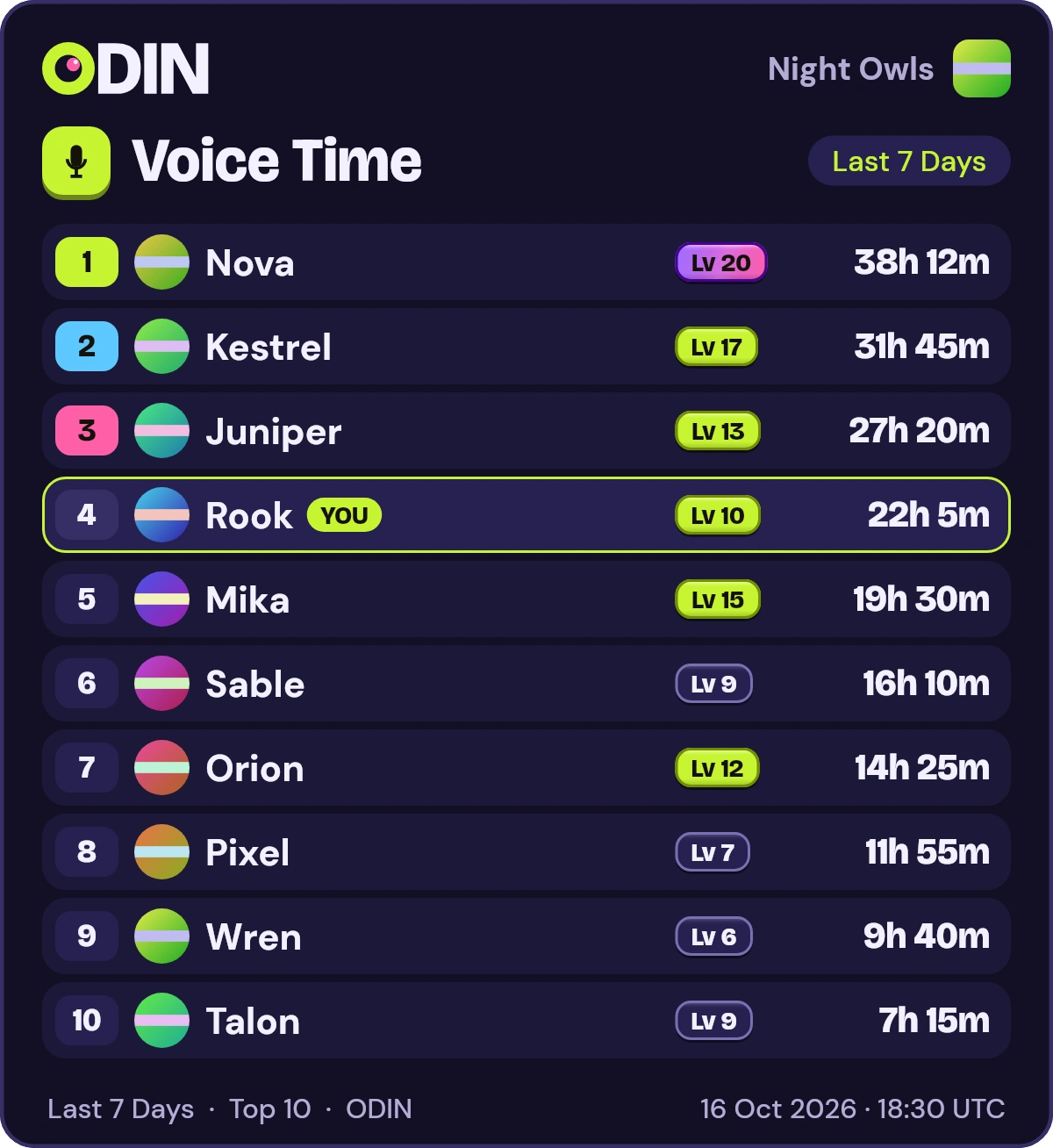
Each row has a rank pill, lime, sky and pink for places 1 to 3, a round avatar, the member's name, a Lv pill with their level and their time in voice. Your own row is highlighted with a YOU tag when you are in the top 10, and shown under a dotted divider below the list when you are not. The footer names the window and gives a UTC time stamp.
Every picture carries alt text with one line for each row, so a screen reader can read the board. Someone with the Administrator permission can switch a server to the text boards with /odin style style:text, and ODIN sends the text board if a picture cannot be made.
If tracking is off, ODIN says “No data found for this server” and names /odin enable.
Rook used /voicetimeframe: Last 7 Days
ODINAPP
On the web: every member, searchable
Log in with Discord for your server's full leaderboards: 25 rows a page, a search box to find any member by name and a Your position row that shows where you stand.
Arrows show how each rank moved against the previous period of the same length. Four figures above the table sum up the board: members on it, the server's voice time, the average per member and the leader's share.
Only members of a server can see its boards. The server stats dashboard has the rest of the website.
- Members on the board
- 12
- Server voice time
- 207h
- Average per member
- 17h 16m
- Leader's share
- 18%
Voice time, 7 days
Your rank: #4, 22h 5m
- Rank 1NovaLv 20Up 1 place38h 12m
- Rank 2KestrelLv 17Down 1 place31h 45m
- Rank 3JuniperLv 13No change27h 20m
- Rank 4RookLv 10YouUp 2 places22h 5m
- Rank 5MikaLv 15Down 1 place19h 30m
Five boards, ordered by voice time
ODIN keeps five boards, in Discord and on the website. Every one except streaks is ordered by voice time in the window you pick.
What changes is what each row shows: /levels adds the lifetime level and /xp the lifetime XP. See how they are earned on the levels and XP page.
Streaks have no window: they list who is on a daily streak right now. Read how voice streaks work.
What each board shows
- /voice
- Time in voice, with each member's level.
- /levels
- Lifetime level, with the time in the window.
- /xp
- Lifetime XP, with the level and the time.
- /members
- The same voice data, titled Top Members.
- /streaks
- Current daily streak, with the best streak.
What counts as voice time
Voice time is the time a member is connected to a voice channel in a server where tracking is on, from joining to leaving. Muted or deafened time counts the same as any other.
Tracking is off until someone with the Administrator permission runs /odin enable. It starts within about a minute, and earlier time is not added. Time ODIN did not see, such as an outage, is never credited, so a restart cannot inflate anyone's numbers.
Members who opt out are not tracked and never listed. See the privacy page.
At a glance
Counts
- Time connected to a voice channel, from join to leave
- Muted or deafened time
- Members already in voice when tracking starts, from then on
Does not count
- Time before
/odin enable - Time ODIN did not see, such as an outage
- Members who ran
/odin optout
Commands
Each card leads to the full entry on the commands page, with its options.
/voiceThe top 10 by voice time, as a picture card with your own row.Options and details/levelsThe top members in the window, shown with their lifetime level.Options and details/xpThe top members in the window, shown with their lifetime XP.Options and details/membersThe same voice data as /voice, under the title Top Members.Options and details/streaksWho has the longest current daily streak.Options and details
Frequently asked questions
How do I see the voice leaderboard of my Discord server?
Run /voice in your server. ODIN answers with a picture card of the top 10 for the window you choose, with your own row highlighted. For the full list, log in with Discord and open your server's leaderboards on the website.
Which time windows can I choose?
The last 24 hours, 7 days, 30 days and all time. In Discord you pick one with the timeframe option, and the default is the last 30 days.
Does /levels order the board by level?
No. Every voice board is ordered by voice time in the window. /levels and /xp show each member's lifetime level or XP next to that time.
Who can see the leaderboards?
The board commands answer in the channel, so anyone who can read that channel sees the reply. The website is for members only: you see just the servers you share with ODIN. Members who ran /odin optout never appear.
Can I have the leaderboard as text instead of a picture?
Yes. Someone with the Administrator permission can run /odin style with the text option to switch the server to text boards, and back with the image option. The picture is the default, and ODIN sends the text board whenever a picture cannot be made.
Why does the bot say No data found for this server?
Tracking is off until someone with the Administrator permission runs /odin enable. Voice time is counted from that moment on.
More of ODIN
See every featureLevels and XP
Every second in voice earns 1 XP, and XP raises each member's level.
ExploreVoice streaks
Spend 10 minutes in voice on a UTC day to keep a daily streak going.
ExploreDuos, trios and quads
See which pairs and groups of friends spend the most time in voice together.
ExploreGame stats
See which games your server plays most, by total play time, with the number of sessions.
ExploreServer stats
A members-only dashboard with voice time trends, an activity heatmap, records and member profiles.
Explore
Give your voice channels a scoreboard
Add ODIN to your server. It asks for no permissions and stays off until an admin turns it on.