Duos, trios and quads
See who plays with whom
ODIN adds up the time that pairs and groups of members spend in the same voice channel at the same time. Run /duos, /trios or /quads in Discord to see which friends spend the most time in voice together.
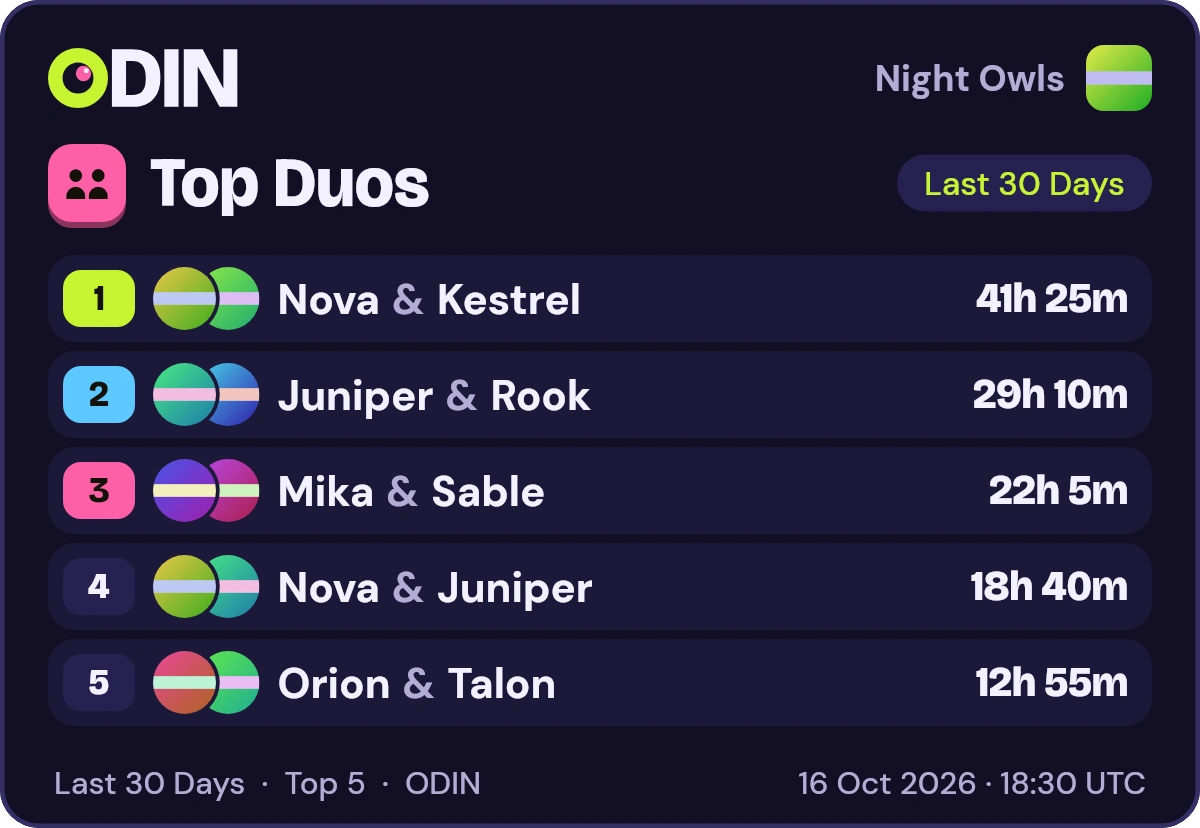
Rook used /duostimeframe: Last 30 Days
ODINAPP
What counts as time together
Time together is the time during which every member of a group was in the same voice channel at the same moment. If one friend is in a channel all evening and another joins halfway through, only the second half counts for the two of them.
The same rule applies to a pair, a trio and a quad. Time in different channels does not count, and neither does a stretch when only part of the group was there.
At a glance
Counts
- Every member of the group in the same voice channel at the same time
- Pairs, groups of three and groups of four
Does not count
- Time in different voice channels
- A stretch when only part of the group was there
- Time before
/odin enable
Every pair, trio and quad in the channel counts
ODIN does not only credit the whole channel. Every pair, every group of three and every group of four that is present earns the time. In a channel of five, every pair among those five is credited, and so is every trio and every quad.
That is why a busy evening does not hide who sticks together: two friends in a full channel still build time as a duo.
Above 20 people in one channel, only pairs are counted for that stretch of time.
How many people are in the channel
- Up to 20 people
- Every pair, trio and quad present is credited.
- More than 20 people
- Only pairs are counted for that stretch.
In Discord: /duos, /trios and /quads
Run /duos for pairs, /trios for groups of three or /quads for groups of four. ODIN answers in the channel with the top 10, so anyone who can read the channel sees the reply.
Each row of the picture card names the members, joined with &, over their overlapping avatars, with their shared time at the right. Where an admin chose /odin style style:text, the text board shows the shared time under the names. The title says Top Duos, Top Trios or Top Quads, and the footer names the window. These boards have no line with your own rank.
Duos, trios and quads are a Discord feature: run the command where your friends are. For individual members, the website has the voice leaderboards and the server stats dashboard.
Rook used /triostimeframe: Last 30 Days
ODINAPP
Night Owls
👨👩👦 Top Trios
- 🥇Nova & Kestrel & Juniper⏱ 9h 20m
- 🥈Juniper & Rook & Nova⏱ 7h 5m
- 🥉Mika & Sable & Orion⏱ 5h 40m
- 4️⃣Kestrel & Rook & Pixel⏱ 4h 10m
- 5️⃣Orion & Talon & Wren⏱ 2h 55m
Last 30 Days · Top 5 · ODIN
Seven days, 30 days or all time
Pick a window with the timeframe option. Duos, trios and quads have three: Last 7 Days, Last 30 Days and All Time. There is no 24-hour window, and the default is 30 days.
The windows are counted in UTC days, and the boards are updated every 10 minutes, so time from a session that just ended can take a little while to show up.
ODIN counts only from the moment tracking is on: someone with the Administrator permission runs /odin enable once. Earlier time is not added.
The timeframe option
- Last 7 Days
- Shared time over 7 UTC days.
- Last 30 Days
- Shared time over 30 UTC days. The default.
- All Time
- Everything ODIN has tracked in your server.
Your choice: leave the boards any time
Any member can leave these boards. A group with an opted-out member is never shown, and you decide for yourself with two commands.
ODIN never reads message content and never records or listens to audio. Read the privacy page for the details.
Opt out and back in
- /odin optout
- Hides you from the boards and stops tracking you in that server.
- /odin optin
- Shows you again and lets ODIN track you.
After /odin optout your earlier data is kept, but it is not shown.
Commands
Each card leads to the full entry on the commands page, with its options.
/duosThe top 10 pairs by time spent together in voice.Options and details/triosThe top 10 groups of three.Options and details/quadsThe top 10 groups of four.Options and details/odin optoutLeave the boards: you are hidden and no longer tracked in that server.Options and details/odin optinCome back: you are shown and tracked again.Options and details/odin enableTurn tracking on. It needs the Administrator permission.Options and details
Frequently asked questions
How do I see which friends spend the most time in voice together?
Run /duos for pairs, /trios for groups of three or /quads for groups of four. ODIN answers in the channel with a picture card of the top 10 for the window you pick: each group's avatars overlap, its names are joined by an ampersand and its shared time is at the right.
How is time together measured?
ODIN adds up the time during which every member of the group was in the same voice channel at the same time. A stretch when only some of them were there does not count for the group.
Do we need to be alone in the voice channel?
No. Other people can be in the channel too. Every pair, trio and quad that is present is credited, so in a channel of five every pair counts. Above 20 people in one channel, only pairs are counted for that stretch.
How often do duos, trios and quads update?
The group boards are updated every 10 minutes. You can choose Last 7 Days, Last 30 Days or All Time, counted in UTC days. There is no 24-hour window.
Are duos, trios and quads on the website?
No. They are Discord commands: run /duos, /trios or /quads in your server. The website has the voice leaderboards, the levels and streaks boards and a stats dashboard for each server.
Can I leave these boards?
Yes. Run /odin optout in your server: you are no longer tracked there, and a group with an opted-out member is never shown. Your earlier data is kept but not shown, and /odin optin reverses it.
More of ODIN
See every featureVoice leaderboards
Rank your server by time in voice over 24 hours, 7 days, 30 days or all time, in Discord and on the web.
ExploreLevels and XP
Every second in voice earns 1 XP, and XP raises each member's level.
ExploreVoice streaks
Spend 10 minutes in voice on a UTC day to keep a daily streak going.
ExploreGame stats
See which games your server plays most, by total play time, with the number of sessions.
ExploreServer stats
A members-only dashboard with voice time trends, an activity heatmap, records and member profiles.
Explore
Give your voice channels a scoreboard
Add ODIN to your server. It asks for no permissions and stays off until an admin turns it on.